What is a URL? Meaning and structure in detail
Table of contents
What is a URL? Many people ask this question when they see a web address for the first time or want to delve deeper into websites and the internet. The URL is a central part of the internet. Without it, we could not open web pages, share links or visit online shops.
In this article, we explain in a simple and easy-to-understand way what a URL is, how it is structured and which terms you should know. Whether you are a beginner or want to expand your technical knowledge, you will get a clear overview here.
What is a URL?
A URL (Uniform Resource Locator) is a web address used to uniquely identify resources on the internet. It works like an address that tells a web browser where it can find a specific web page or file.
Basically, a URL is the complete path to a resource on the internet. It is often referred to as a “web address” and contains all the information needed to reach the desired content.
The URL is often entered into the address bar of a browser to visit a website. For example, https://www.beispielseite.ch is a typical URL that points to a company's web page. Every URL is unique and points exactly to the location of a specific resource on the internet.
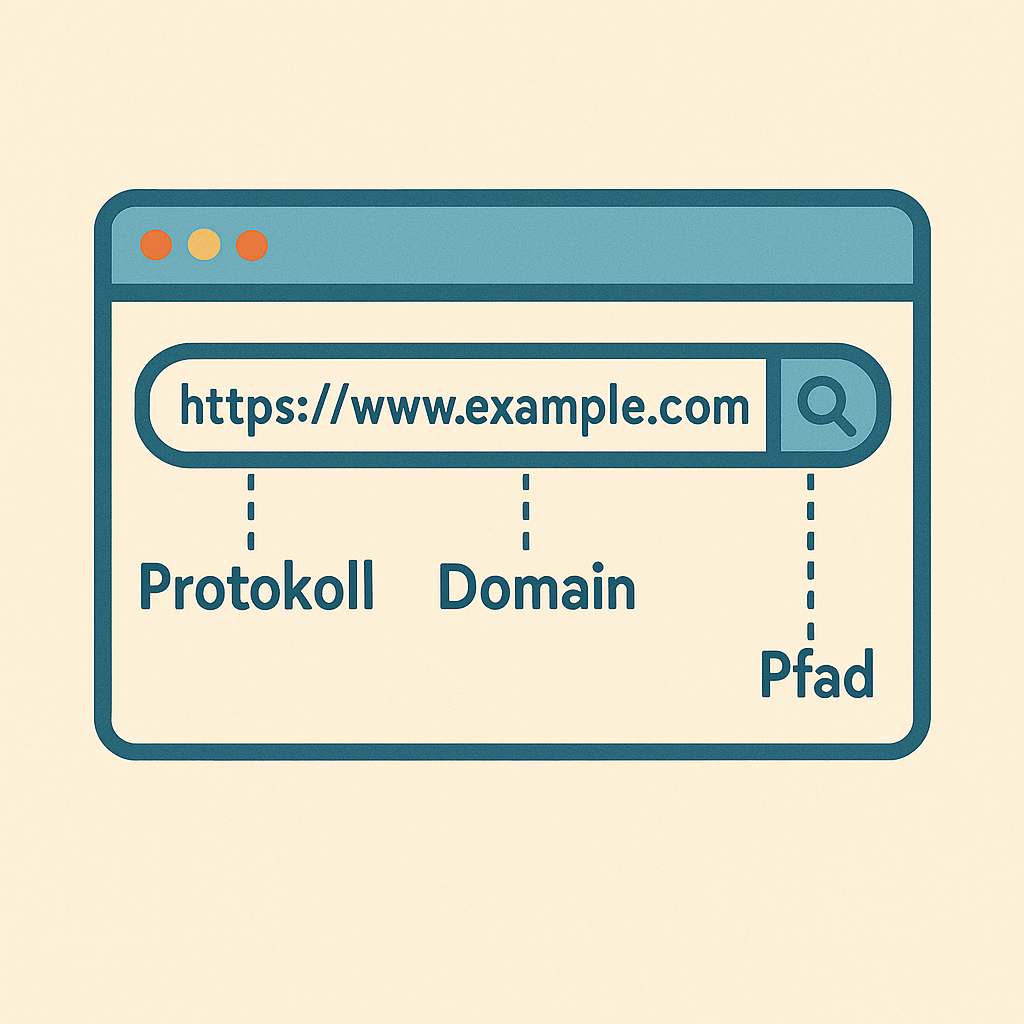
Structure of a URL
A URL consists of several important components, each with a specific function. To better understand the structure of a URL, let's take a closer look at the individual parts:
Protocol (Scheme)
The protocol specifies how the browser should communicate with the server. In most cases, this is “https” for a secure connection. “http” is sometimes used as well, although it is less secure.
Example: https://
Domain (Host)
The domain is the name of the server on which the website is hosted. It is the main component of every URL and helps the browser find the website.
Example: www.beispielseite.ch
Path
The path specifies which resource on the server should be accessed. It is often a specific page or file stored on the website.
Example: /blog/artikel
Parameters (Query Parameters)
Optional parameters are added after a question mark “?”. They transmit additional information or filters to make a more specific request to the server.
Example: ?id=123
Example of a complete URL: https://www.beispielseite.ch/blog/artikel?id=123
In this example, the URL points to a specific page (the article) on the website and also contains the parameter “id=123”, which probably specifies a particular ID for the article.
Differences: URL, URI & Domain
The terms URL, URI and domain are often confused. These terms are related but have different meanings. Let's take a closer look at each of them:
1. What is a URL?
The URL (Uniform Resource Locator) is the specific locator of a resource on the internet. It contains all the necessary information to find a web page or file on a server. A URL is a complete address that specifies both the type of protocol and the location of the resource on the server.
Example: https://www.beispielseite.ch/blog/artikel?id=123 In this example, the URL is the complete address that includes the protocol (https://), the domain (www.beispielseite.ch), the path (/blog/artikel) and the parameter (?id=123).
2. What is a URI?
The URI (Uniform Resource Identifier) is a generic term for all types of identifiers that point to a resource on the internet. A URI can be a URL or a URN (Uniform Resource Name). The key difference is that a URI simply identifies a resource, while a URL additionally contains information on how the resource can be retrieved.
Example of a URI: urn:isbn:0451450523 This URI identifies a book by its ISBN number without specifying where the book can be found.
3. What is a domain?
The domain is the name of the server on which a website is hosted. In a URL, the domain is the part that specifies the address of the web server. The domain makes it possible to find websites easily without having to enter the server's full IP address.
Example: In the URL https://www.beispielseite.ch/blog/artikel, “**www.beispielseite.ch**” is the domain. It indicates the server on which the website is hosted.
Why is a URL important for SEO?
A well-structured URL is crucial for SEO because it helps search engines understand the content of a page. URLs that contain relevant keywords have a better chance of ranking higher in search results. A clear, understandable URL is also important for users, as it makes the page easier to recognise and click on.
Dynamic URLs with long parameters should be avoided, as they are harder for search engines to index. Instead, clear, descriptive URLs are an advantage. In addition, the HTTPS protocol is now essential, as Google prefers secure pages and ranks them better.
A clean URL therefore not only contributes to better findability in search engines, but also provides a better user experience.
Domain providers: Where can you buy a domain?
To create a website, you need a domain that serves as your address on the internet. Fortunately, there are many domain providers where you can register a domain. Here are some popular providers:
Shopify: Shopify not only lets you create an online shop, but also buy a domain and integrate it directly into your shop. Shopify
IONOS: IONOS is known for a wide selection of domain extensions and also offers hosting, email and security solutions. IONOS
GoDaddy: GoDaddy is one of the largest domain providers worldwide and offers a huge selection of domains as well as additional services such as web hosting and SSL certificates. GoDaddy
Namecheap: Namecheap offers low prices for domains and user-friendly management. It also provides hosting and SSL certificates. Namecheap
Strato: Strato offers domains as well as hosting, a website builder and cloud services, ideal for small and medium-sized businesses. Strato
The right domain provider depends on your needs. Make sure the provider also offers additional services such as SSL certificates and email services, which are important for running your website.
Conclusion
The URL is far more than just a web address. It is an important component of every website that is crucial for both search engines and users. A well-structured URL not only helps a page rank better in search results, but also provides a better user experience. Clear, meaningful URLs that contain relevant keywords, along with the use of HTTPS, can improve a website's findability and security.
Remember that every URL is an opportunity to communicate the content of your page, both to search engines and to users. A well-thought-out URL structure contributes to better SEO and a higher click-through rate, which can increase your website's success in the long term.